How much of your sponsor management currently lives in Excel lists, Word documents and email inboxes? If the honest answer is “most of it”, you are in large but risky company. Ray Panko of the University of Hawaii has been researching spreadsheet errors since the late 1990s. His finding, stable over decades: around 88% of all audited spreadsheets contain at least one error.
This guide shows you in six steps how professional clubs and sports marketing agencies migrate their sponsor management from Excel to a professional solution. The results figures at the end come from a real migration project at a football club in the 2. Bundesliga (Germany's second football division). As a provider of sponsorship management software, we write from the hands-on experience of our own migration projects. For an overview of the whole topic, read the complete guide to sponsorship management.
Key takeaways
Around 88% of all audited spreadsheets contain errors (Panko, University of Hawaii). Sponsorship data in Excel is a business risk.
Six steps get you there: inventory, clean-up, processes, software selection, parallel run, automation.
Plan for two to four project weeks. The biggest block is data clean-up, not the technology.
After migrating, reference customers save 40 minutes per contract and 85% of their invoicing effort. Forgotten invoices are a thing of the past.
Why is Excel no longer enough for sponsor management?
Excel fails at sponsor management on three counts: error-proneness, missing processes and invoicing. Ray Panko's spreadsheet research (University of Hawaii) has shown since the late 1990s that around 88% of all audited spreadsheets contain at least one error, and 1 to 5% of all formula cells are wrong.
The real problem is self-deception. In a 2015 paper (arXiv:1602.02601), Panko describes a massive perception gap: developers estimated the probability of an error in their own spreadsheet at around 18%, while the actual rate was 86 to 88%. In other words, we underestimate the error risk in our own spreadsheets by a factor of more than four.
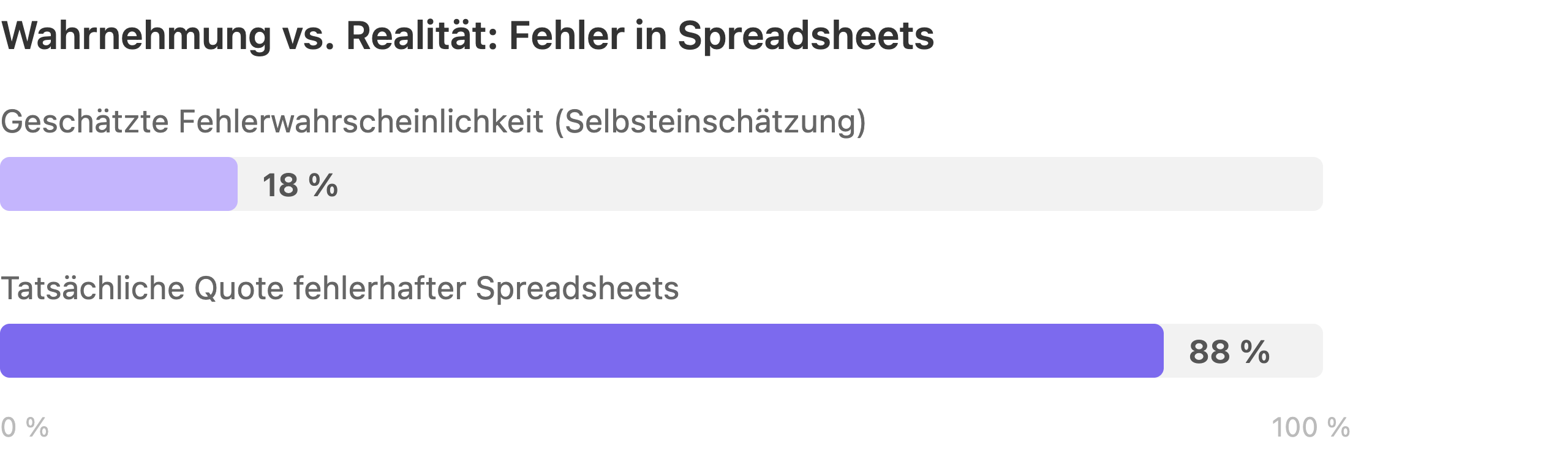 Error-proneness of Excel spreadsheets: perception vs. reality
Source: Ray Panko, University of Hawaii (spreadsheet error research 1998 to 2016; self-assessment: arXiv:1602.02601, 2015)
And the consequences are not theoretical. In 2024, the UK data protection regulator, the ICO, fined the Police Service of Northern Ireland (PSNI) £750,000: a hidden worksheet in a published Excel file contained personal data of thousands of officers (EuSpRIG Horror Stories). Sponsor contacts are personal data under the GDPR too. An Excel file circulating by email has neither access control nor a deletion policy.
A direct comparison shows where the structural limits lie:
Criterion | Excel | Sponsor management (software) |
|---|---|---|
Error risk | ~88% of spreadsheets contain errors (Panko) | Verified master data, validation on entry |
Double bookings | No reservation logic | Inventory is blocked as soon as an offer goes out |
E-invoicing (EN 16931) | Practically impossible to do manually | XRechnung/ZUGFeRD generated automatically |
Multi-client capability | File copies for each client | Separate datasets and reports |
Access rights (GDPR) | Anyone with file access sees everything | Role-based permission management |
Reporting | Manual analysis for every request | Real-time dashboards |
One item in this table becomes mandatory in Germany in 2027: e-invoicing. You can read why this makes the switch even more urgent in the article Mandatory e-invoicing for sports clubs.
What do you need before the migration?
You need four things: an honest stocktake, one person in charge, backing from the top and a realistic time window. Go through this checklist before you start:
Inventory of all files and sources: Excel lists, Word contracts, email inboxes, perimeter board layouts, shared drives.
A migration owner: one person with decision-making authority, not “the team, on the side”.
Buy-in from management and accounting: Without the finance department, any link to your invoicing processes will fail.
Realistic timeline: two to four project weeks alongside day-to-day business, depending on data quality and contract volume.
Level of difficulty: medium. Not an IT project, but not a quick afternoon job either.
Who is driving the project at your club? If you cannot answer that question in one sentence, settle it before step 1.
Step 1: Take inventory of all data sources
By the end of this step, you have a complete list of every place where sponsorship data lives. Here is how to go about it:
Collect every Excel file related to sponsors, including old versions on local drives, in cloud folders and in shared sheets.
Record all Word contracts and PDFs, including signed scans that only exist as email attachments.
Search your sales staff's inboxes for side agreements, commitments on free tickets and hospitality, and terms agreed verbally. This is exactly where the rights that nobody remembers later get lost.
Put perimeter board layouts, stadium plans and inventory lists side by side and work out what really exists: static boards, LED perimeter boards, video cubes, hospitality areas, print and digital channels. Only then will you know which advertising space you actually have to sell.
For agencies, there is an extra dimension: keep the inventory strictly separate for each client, otherwise rights and inventories will get mixed up later.
Step 2: Clean up and consolidate your data
The goal of this step: a single, cleaned-up master spreadsheet as the basis for the import. The effort pays off, because if you carry old errors over unchecked, you simply move the chaos into a new system. Work through these sub-steps:
Remove duplicates: The same sponsor often appears several times, once as “Müller GmbH”, once as “Mueller”. Define one record as the master.
Flag outdated prices: Do you know the currently valid price of every board, every box and every shirt package? Anything without documentation gets checked or deleted.
Set a consistent naming convention for your inventory: “North Board 12”, not the same item three times under three different names.
Clarify contract status: active, expiring, terminated, under negotiation. No record without a status.
Update contact persons: One phone call clears up more than three old email signatures. That applies to internal contacts just as much as to the contact person at the sponsor.
Plan the biggest time block of the project for this, typically a third of the total time. The reality check: two random samples per category (sponsor, contract, inventory) hold up when compared with the original contract.
Step 3: Define your processes, from offer to invoice
Afterwards, it is clear in writing who does what and when: from the offer through the contract to the invoice. The market increasingly demands this level of professionalism. According to the European Sponsorship Market Overview by ESA and Nielsen Sports (March 2026), Germany was Europe's largest single market in 2025 at €6.26 billion.
Software maps processes. It does not invent them. So before you choose, define the following:
Offer phase: Who creates offers, on what price basis and with which discount limits?
Approvals: Above which contract value does management have to sign off?
Reservations: How is inventory blocked when an offer goes out, so the same board is not sold twice?
Contract signing: Who enters the signed contract into the system, and who checks the contracted deliverables?
Invoicing run: Who issues invoices and when, according to which payment schedule, and who sends reminders?
Keep it to two pages at most. Nobody reads an overcomplicated process manual, and without one, everyone falls back on their own habits.
Step 4: Choose your software and check the requirements
After this step, you have chosen a solution that demonstrably meets your must-have requirements. Check vendors against this list:
E-invoicing to EN 16931: The system must be able to generate and receive XRechnung and ZUGFeRD. In Germany, this becomes a legal requirement from 2027. Details in our article on mandatory e-invoicing for sports clubs.
Accounting and DATEV integration: DATEV is the accounting software most German tax advisers work with. Invoice data must flow into your financial accounting without being entered twice.
Multi-client capability: A must for agencies, with cleanly separated inventories and reports for each client.
CRM and Excel import: You must be able to transfer your cleaned-up existing data in a structured way.
Links between stadium plan and inventory: Manage advertising space visually instead of scrolling through rows 400 to 900.
Your check: each of the five requirements was shown to you live in the demo, not just promised.
Step 5: Import your data and run both systems in parallel
By the end of this step, your cleaned-up data is in the new system, and one full processing cycle has run in both systems. The parallel run is your insurance: according to Panko, 1 to 5% of all formula cells in spreadsheets are wrong, and old errors like these only surface when you compare two systems.
This is how the import works:
Import master data (sponsors, contacts) first, then inventory, then contracts. This order prevents orphaned links.
Only transfer records from the cleaned-up master spreadsheet from step 2, no “backup copies” of old lists.
Run one cycle twice: a month-end close or an invoicing run takes place in parallel in Excel and in the new system.
Check every discrepancy individually. Usually the error is in the old spreadsheet, not in the new system.
Document the discrepancies. This list is your argument to management for why the project is worth it.
Important: the parallel run needs a fixed end date, and one cycle is enough. Acceptance criterion: both systems deliver identical contract totals and invoice amounts for the same period, and every difference is explained.
Step 6: Activate automation and onboard your team
Now it is about day-to-day operation: your team works in the new system, and routine tasks run automatically. The biggest potential lies in invoicing: Billentis process cost analyses (2016/2019) put the savings from automated e-invoicing processes at 60 to 80% compared with manual handling.
Activate automation in this order:
Automatic invoice creation based on payment schedules: Instalments, season invoices and additional services are invoiced on time, without anyone having to remember them. You can see what this looks like in practice in the case study Automating invoicing in sponsorship.
Reporting dashboards: Contract volume, open items and inventory utilisation at a glance, instead of patching Excel reports together every month.
Permission management: Sales sees offers and contracts, accounting sees payment flows, management sees everything. Interns no longer change price lists.
Do not underestimate onboarding. Plan one training session per role, not one for everyone. A salesperson needs different functions from the accounting team. Also appoint an internal point of contact for the first few weeks. The honest benchmark: four weeks after go-live, nobody on the team has created a new Excel list for sponsorship data.
What are the most common migration mistakes?
We see four mistakes in migration projects again and again, and all of them are avoidable. The first is the most expensive: if, according to Panko's research, around 88% of all spreadsheets contain errors, an unchecked data import carries these errors straight into the new system, only with a wider reach.
Importing legacy data unchecked. It is tempting to cut step 2 short and “just move everything over first”. Afterwards, nobody trusts the new system, because the old errors are now in there. Clean up before the import, not after.
Scheduling the migration during pre-season. In our projects, timelines almost never failed because of the technology, but because of the calendar. One club wanted to handle the data import alongside its pre-season preparation: sales was negotiating renewals, master data changed daily, and the team had to re-import three times to catch up. Schedule the migration for the quietest phase of your year, typically right after the end of the season.
Involving only the club office, not sales. The people who sell have to back the system. A sales team that keeps writing offers in Word undermines the database from day one. Bring your sales staff to the table as early as step 3.
Keeping Excel running without an end date. Two parallel versions of the truth are worse than one flawed one. Set a hard switch-off date for the old lists, communicate it, and then archive the files as read-only.
What results can you expect?
Measurable ones, and quickly. The biggest manual effort in sponsor management rarely lies in the selling itself, but in the work around it: piecing contracts together from old copies, checking offers against the current price list, transferring invoice data into the accounting system by hand. This is exactly where migrating from Excel to specialised sponsor management software makes the difference.
At one of our reference customers, the effort per contract created fell by 40 minutes, because offers are built from verified, versioned price lists instead of copied templates. The sales process became 30% shorter, because enquiry, offer and approval come together in one system instead of travelling back and forth by email. And invoicing effort fell by 85%, because the invoice is generated directly from the contract data.
All of this without retyping and without transfer errors.
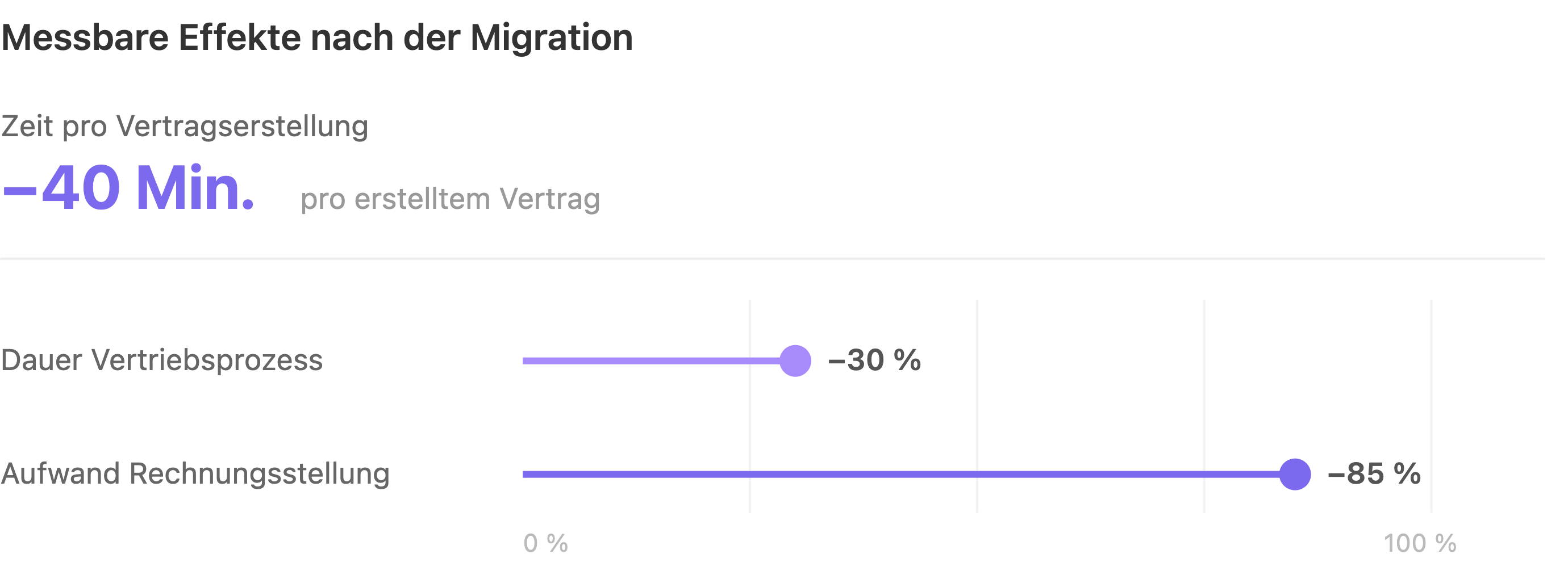 Measurable effects of the system migration in figures.
Source: Paktum customer data, season 24/25 (migration project at a reference customer)
What does this mean day to day? Fewer manual transfers mean fewer errors and less rework. That leaves more time for the actual business: winning and keeping sponsors. Above all, management sees inventory utilisation as it stands each day, before the season rather than after it, and can market unsold space in a targeted way before it goes to waste.
The market rewards this professionalisation. The European Sponsorship Market Overview by ESA and Nielsen Sports (March 2026) puts the European sponsorship market in 2025 at €34.45 billion, 72% of it in sport. If you negotiate in this environment, you increasingly compete with professionally organised rights marketers. Agencies with several clients have their own requirements. Find out more in the article Sponsor management for sports marketing agencies.
Conclusion
Excel was good enough to get started, but it is no longer enough for professional sponsor management. With six steps, from inventory through clean-up to the parallel run, the migration is a plannable project of just a few weeks. The figures from reference customers show what becomes possible afterwards: 40 minutes less per contract, 85% less invoicing effort and no more forgotten invoices.
Want to check what the switch would look like for you? Book a demo with Paktum and simply bring your current Excel list along.
Frequently asked questions (FAQ)
How long does the migration from Excel to sponsor management software take?
Expect two to four project weeks alongside day-to-day business. Data clean-up takes up the largest share, not the technology. On top of that comes a parallel run over one full cycle, such as an invoicing run. Clubs with well-maintained lists are faster, while agencies with several clients should plan for the upper end.
Can I import my Excel data directly?
Yes, common systems take over existing data via Excel or CSV import, often complemented by a CRM import. But directly does not mean unchecked: import only the cleaned-up master spreadsheet from step 2. If you import duplicates and outdated prices along with it, you only move the Excel chaos into a new system.
What does manual invoicing really cost?
More than most people think. Billentis process cost analyses (2016/2019) put staff costs at €5 to €15 per manually created paper invoice, and automated e-invoicing processes cut that by 60 to 80%. With dozens of sponsor invoices per season, this pays off quickly. Details in the case study Automating invoicing in sponsorship.
Is the switch also worth it for agencies with several clients?
Especially for them. Agencies manage inventories, contracts and invoices for several clubs at once, and Excel multiplies the sources of error with every client. Multi-client capability is the deciding factor: separate datasets, client-specific reports and separate permission management for each client. Check this explicitly in the demo.
Sources
Ray Panko, University of Hawaii, Spreadsheet Error Research (list of publications), accessed 2026-07-08, https://panko.com/ssr/Ray'sPublications.html
Ray Panko, What We Don’t Know About Spreadsheet Errors Today (EuSpRIG 2015, arXiv:1602.02601), accessed 2026-07-08, https://arxiv.org/abs/1602.02601
EuSpRIG, Horror Stories, accessed 2026-07-08, https://eusprig.org/research-info/horror-stories/
Billentis, The E-Invoicing Business Case (process cost analyses 2016/2019), accessed 2026-07-08, https://billentis.com/assets/reports/e-invoicing-businesscase.pdf
ESA / Nielsen Sports, European Sponsorship Market Overview (March 2026), accessed 2026-07-08, https://sponsorship.org/european-sponsorship-market-reaches-e34-45bn-in-2025-as-growth-continues-across-all-sectors/
Paktum, customer data from a migration project at a 2. Bundesliga club, season 23/24 (internal analysis)